
 ReactiveUI
Troubleshooting
The problems that catch everyone once, grouped by topic, each with its cause and a fix.
Each problem below starts from what you see, explains the cause and shows the fix, with a link to the page that goes into more depth. The problems are grouped by the part of Reactive they come from, so a hole in a layout is under Layout.
Setup
sText doesn't exist
The s-properties are written by the Reactive compiler, a source generator, so when it isn't running, none of them exist. Here's a component that works in a set-up project, built in one without the compiler:
using Reactive.BeatSaber.Components;

class App : ReactiveComponent {
    protected override GameObject Construct() {
        var title = Remember("Hello");

        return new Label {
            sText = title
        }.Use();
    }
}App.cs(8,13): error CS0117: 'Label' does not contain a definition for 'sText'
Nothing in the library defines sText, so without the generator Label has no such member. The compiler has to be
referenced as an analyzer, and LangVersion has to be latest, because the generated code uses extension members:
<PropertyGroup>
    <LangVersion>latest</LangVersion>
</PropertyGroup>

<ItemGroup>
    <PackageReference
        Include="Reactive.Compiler"
        Version="1.0.0"
        PrivateAssets="all" />
</ItemGroup>
When you build Reactive from source, reference the compiler project with OutputItemType="Analyzer" instead. Rebuild
afterwards either way, since IDEs often need one build before they see a generator's output.
Read Getting Started.
sText works in Construct but not in helpers
The generator only looks inside methods marked [StateGen], and Construct inherits the attribute while a helper
doesn't. This helper is missing it:
class App : ReactiveComponent {
    protected override GameObject Construct() {
        var title = Remember("Hello");

        return CreateTitle(title).Use();
    }

    private static Label CreateTitle(IState<string> title) {
        return new Label {
            sText = title.In()
        };
    }
}App.cs(10,13): error CS0117: 'Label' does not contain a definition for 'sText'
The generator never reads the helper, so it never writes sText for it. The attribute alone isn't always enough either,
since a state typed as IState<T> has to be wrapped with .In():
class App : ReactiveComponent {
    protected override GameObject Construct() {
        var title = Remember("Hello");

        return CreateTitle(title).Use();
    }

    [StateGen]
    private static Label CreateTitle(IState<string> title) {
        return new Label {
            sText = title
        };
    }
}App.cs(11,21): error CS0029: Cannot implicitly convert type 'Reactive.IState<string>' to 'Reactive.Compiler.StateBinder<string, Reactive.IState<string>>'
C# won't apply a user-defined conversion from an interface, and .In() makes that conversion explicit. With both the
attribute and .In(), the helper compiles:
class App : ReactiveComponent {
    protected override GameObject Construct() {
        var title = Remember("Hello");

        return CreateTitle(title).Use();
    }

    [StateGen]
    private static Label CreateTitle(IState<string> title) {
        return new Label {
            sText = title.In()
        };
    }
}
Read Bindings.
Layout
FlexItem does nothing
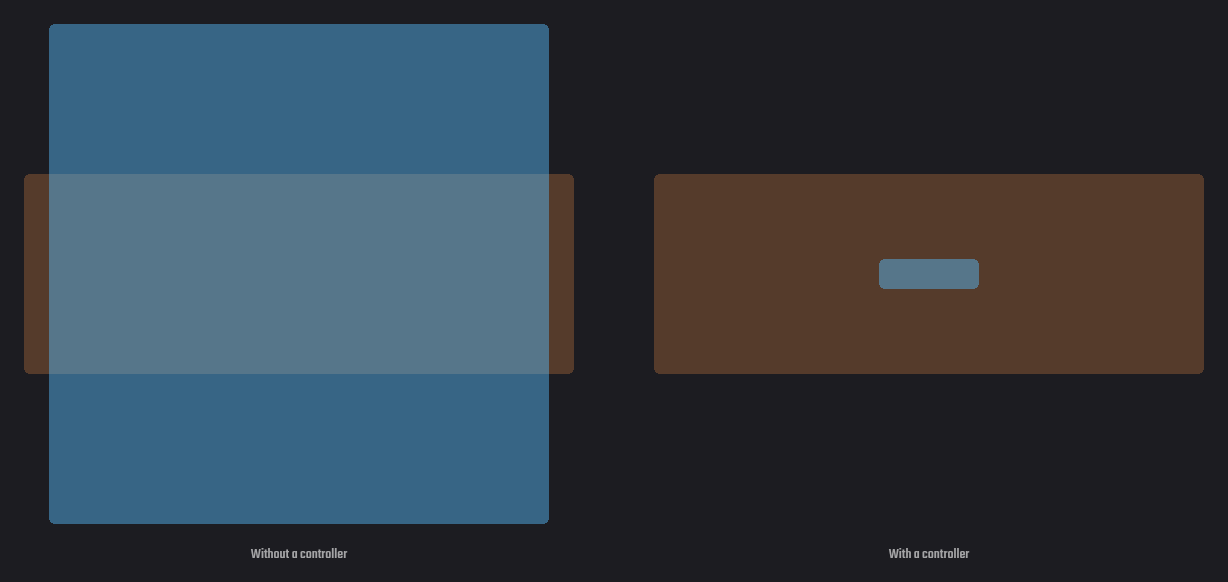
A FlexItem is read by the parent's controller, so if the parent has no FlexController, nothing reads it and the
size or margin is ignored. The parent only needs a controller for the child's settings to apply:
new Background {
    // Without this, the size below is never read
    FlexController = {
        JustifyContent = Justify.Center
    },

    Children = {
        new Label {
            FlexItem = {
                Size = new() { x = 20.pt, y = 6.pt }
            }
        }
    }
}
Read Layout System.
FlexController = { } does nothing
An empty initializer never touches the property's getter, so no controller is created and the children aren't laid out. They keep Unity's default rects, which is why such a component looks 100 by 100 with its children wherever their rects put them:
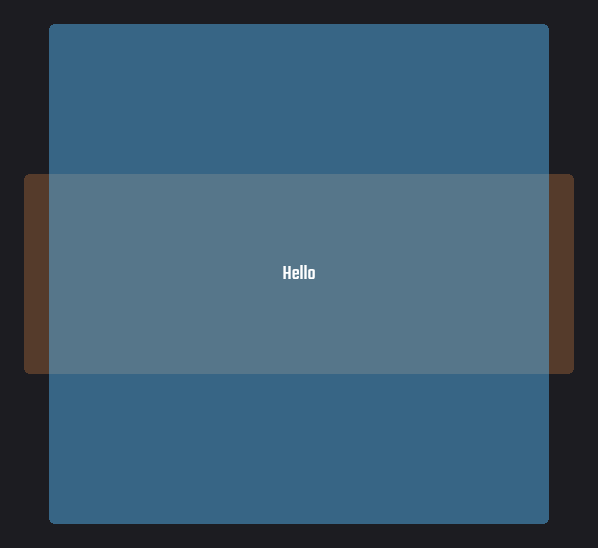
Set at least one property, or call AsFlexGroup() when the defaults are all you want:
// Creates nothing
new Background { FlexController = { } }

// Creates a controller
new Background {
    FlexController = { FlexDirection = FlexDirection.Row }
}

// Creates one with the defaults
new Background().AsFlexGroup()
Read Layout System.
Root expands to fill its parent
A root is a layout that nothing lays out, so it's sized against the rect it's attached to and fills it. That suits a full screen, but a popup or a tooltip should fit its content, which takes turning the constraint off on both axes:
new Background {
    FlexController = {
        ConstrainHorizontal = false,
        ConstrainVertical = false
    },

    Children = {
        new Label { Text = "Fits its text" }
    }
}.Use(transform);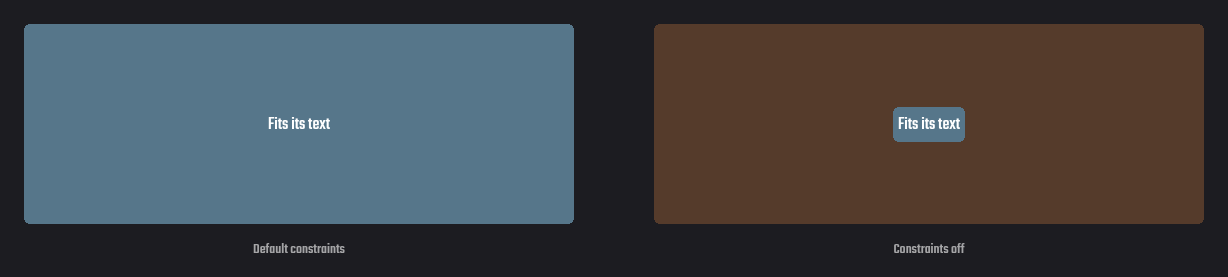
A full screen that comes out too small is attached to something smaller than the view, and Use(transform) on the view
controller itself gives it the whole view. The layout also never moves a root, so placing it is up to its anchors.
Read Layout System.
Hidden component left a hole, or content jumped
A disabled component leaves its parent's layout by default, so everything after it moves up. When the jumping looks worse than an empty space, keep the component in the layout while it's hidden:
new Label {
    Text = "Saved",
    WithinLayoutIfDisabled = true
}
If you wanted the content to close up and it didn't, that flag is set somewhere, or the component is still enabled.
Read Layout System.
State
Label didn't update right after setting its state
It did, from the point of view of the frame. State changes are delivered once per frame, right before the UI renders, so reading the label on the next line still shows the old text while the screen shows the new one. Code that needs the result before the end of the frame can deliver everything at once:
count.Value++;

// Still the old text here
Debug.Log(label.Text);

ReactiveScheduler.Run();

// Now the new one
Debug.Log(label.Text);
Read Reactive State and The Update Cycle.
RememberDerived doesn't follow one of its inputs
The lambda reads a state that wasn't passed in as a dependency, so a change to that state doesn't recompute the result.
The compiler reports this as RV061, and the fix is to pass the state and take its value as a parameter:
// Doesn't follow name, only count
var line = RememberDerived(
    count,
    predicate: x => $"{name.Value}: {x}"
);

// Follows both
var line = RememberDerived(
    name,
    count,
    predicate: (n, x) => $"{n}: {x}"
);
Read Derived States.
Lists and pools
List shows wrong items after changes
Cells are reused and handed new items through their context, so a cell that copied something from its item when it was built keeps showing the old item. Everything a cell shows has to be a binding on the context:
ConstructCell = context => new Label {
    // Set once, so a reused cell keeps its first item's name
    Text = context.Item.Name,

    // Follows whatever item the cell is handed
    sText = context.Map(x => x.Item.Name)
}
Read Repeaters and Tables.
Pooled component shows stale data
Despawning only disables a component, so the next spawn gets it back with everything its last use left on it. Set
whatever differs between uses after every spawn, and restart timers in OnEnable, which runs when the pool enables
the component again:
var popup = _pool.Spawn();

// A reused popup still has its last text and place
popup.Text = $"+{points}";
popup.Point = point;

// Inside the popup
protected override void OnEnable() {
    _age.Value = 0f;
}
Read Component Pooling.
Modals
Modal throws "The object is not in the composition stack"
A modal opens over the nearest Composition above it, which the plugin adds to every ViewController as it activates,
and it looks for one the moment it's pushed. It throws when nothing above it has one, which happens in two ways. The
first is a tree that isn't inside a view controller at all, like a floating screen or a canvas of your own, and adding
the component to the root of that tree gives the modal somewhere to open:
// The root of a UI that isn't a view controller
root.gameObject.AddComponent<Composition>();
The second is a modal pushed before its tree is attached anywhere. A binding applies its state's value as soon as it's
set, so a modal bound to a state that starts as true is pushed inside Construct, while the tree is still on its own.
Start the state as false and open the modal from OnStart, which runs once the component is in place:
private State<bool> _opened = null!;

protected override GameObject Construct() {
    _opened = Remember(false);

    return new Layout {
        Children = {
            new Modal {
                sIsPushed = _opened,

                Children = {
                    new Label { Text = "Welcome" }
                }
            }
        }
    }.Use();
}

// Runs after the component is attached
protected override void OnStart() {
    _opened.Value = true;
}
Modal opens only once
Clicking the dimmed area doesn't close a modal by itself, so if nothing clears the state there, the modal stays pushed
as far as the state knows. The next open then sets a value that's already true and nothing happens. Clear it in
OnClickOutside as well as in the close button:
new Modal {
    sIsPushed = opened,
    OnClickOutside = () => opened.Value = false
}
Input
Scrolling works with mouse but not joystick
In VR there's no mouse wheel, so onScroll on its own only fires in FPFC. Scroll areas and tables attach a
VRScrollAdapter to turn the joystick into scrolling, and any graphic of yours can use the same one:
new Background {
    Do = x => x
        .WithPointerEvents(onScroll: HandleScroll)
        .WithNativeComponent(out VRScrollAdapter _)
}
Read Pointer Input and Interaction.
Dragged component freezes at edges
Hover and move events stop once the pointer leaves the object, so following the pointer with them breaks at the edge.
Drag events keep coming to the pressed object whenever the pointer moves, until it's released, so follow it from
onDrag instead:
Do = x => x.WithPointerEvents(
    onDown: h => knob.Value = ToOffset(h),
    onDrag: h => knob.Value = ToOffset(h)
)